
Taxi office and fleet management

Every trip clear. Every account recorded.
From the first booking to completed transport and settlement, KONSO connects your office, drivers and customers in one workflow on the web and Android phones.
One view of your office and fleet
Developed by UltraPlans Systems, KONSO brings together bookings, pricing, dispatch, trip progress, locations and accounts. Office branding, fares, vehicles, users and permissions are configured for your operation.
KONSO
Three interfaces. One connected journey.
01
Office: a clearer view
Follow bookings, driver locations and availability, shifts and queue priority, then confirm a suitable driver and vehicle. Candidate proximity uses straight-line distance when a recent location is available; it does not guarantee the fastest arrival.
02
Driver: assignments and accounts
Receive assignments and record acceptance, arrival, start and completion, confirming cash collection where applicable. Review balances, commissions and payments, or declare a previous trip for office approval.
03
Customer: book and follow
Set pickup and destination by address or map and follow the fare, status and assigned driver. Reuse previous destinations and submit trip-linked feedback, complaints or lost-item reports.
From booking to settlement
01
The customer submits a booking, or the office records a phone or in-person request.
02
The fare is calculated or quoted, with customer approval when required.
03
The office selects a suitable driver and vehicle and sends the assignment.
04
The driver records acceptance, arrival, start and completion.
05
Cash collection is confirmed and the completed trip enters the accounts.
06
The office reviews settlements and reports; the customer follows office replies.
Tools for today. Insight for tomorrow.
Pricing that fits your office
Fixed fares, distance-and-time pricing or office quotations, with vehicle classes, surcharges and subscriber discounts. Road measurements require a configured routing service; estimates are clearly identified.
Accounts kept clear
Commissions, settlements, receipts, payouts, cash, prepaid and postpaid accounts and credit limits. Currencies remain separate; the full trip fare is not office revenue.
Reports for better oversight
Driver and customer activity, trips, balances and frequent destinations, printable or saved as PDF through the browser. Management tools also cover expenses, additional income and annual budgets.
Maps, locations and shifts
Follow availability and device-reported locations and organize shifts and the queue. Recent locations depend on internet access, location permission and a running app. Missing information remains unspecified.
Your branding and notifications
Office name, logo and contacts, with notification templates and recipient previews. In-app notifications, Web Push and Android Firebase are available after services and permissions are configured.
Permissions and backups
Accounts, roles and operational records, with database backup creation, verification and Google Drive upload after authorized connection. Hosting, backup schedules and recovery are agreed during setup.
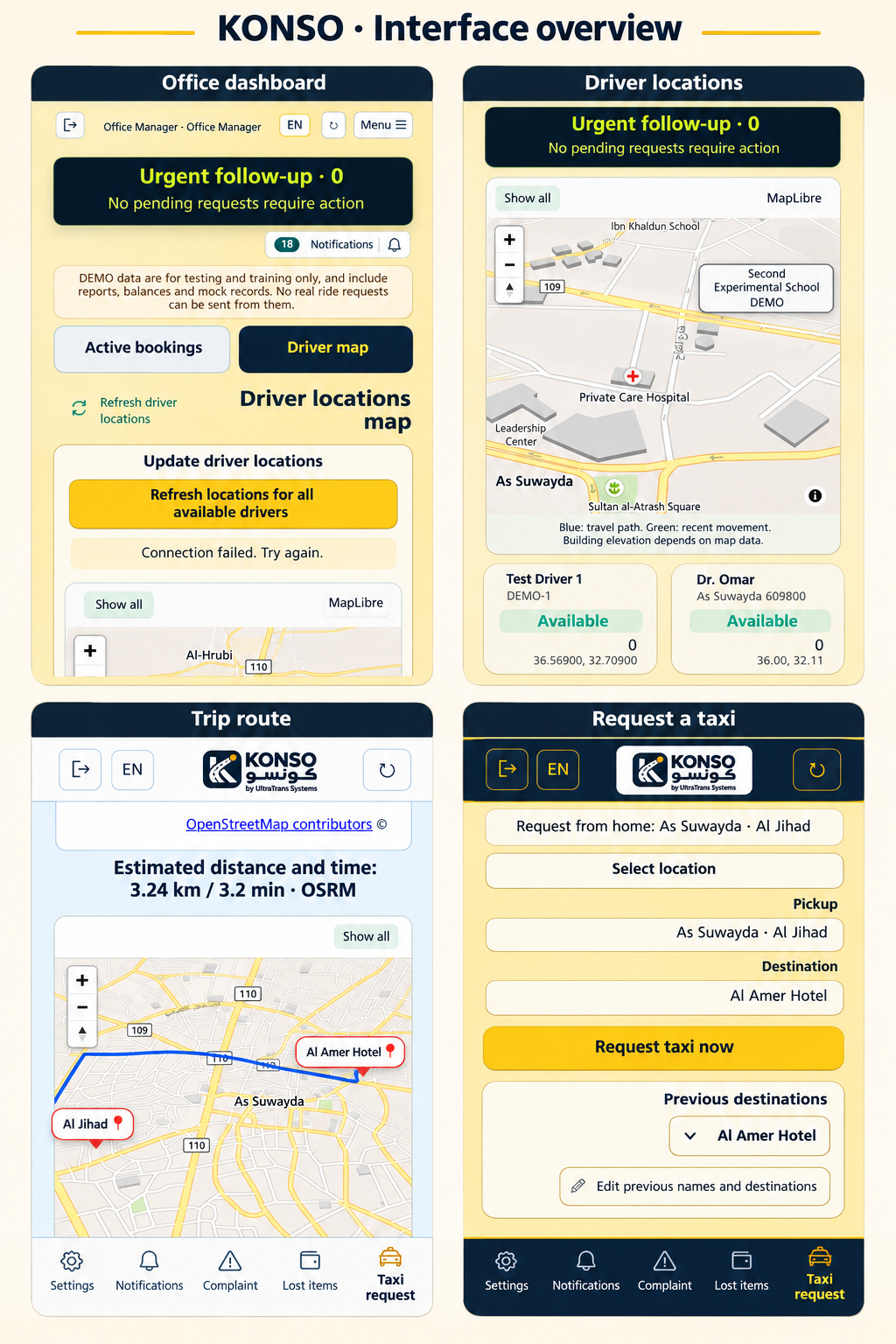
KONSO on a phone
Localized presentation based on the supplied screenshots: office dashboard, driver locations, trip route and taxi request. Illustrative translations; the current application supports Arabic and English. Open the image to view all four screens in full.
KONSO for families and the community
Closer reassurance, even from home.
When travel in As Suwayda brings uncertainty, families need clearer information and an easier way to reach a taxi office they know. KONSO helps organize journeys for women, girls and children through an assigned driver and an accountable office, supporting confidence and peace of mind.
Follow your child’s taxi journey from your phone at home
When journey tracking is enabled and available to your account, you can view your child’s taxi route and the location reported by the system, follow the booking status and contact the office when needed. It also helps you stay informed about a family member’s journey to school, work or an appointment.
For families: less uncertainty
Trip status, the assigned driver and route visibility help parents stay informed and reassured from home.
For women, girls and children: clearer communication
A booking linked to a known office, accessible journey records and channels for complaints and lost items support more organized travel and greater peace of mind.
For the community: trust through accountability
Records, follow-up and office replies make responsibility clearer and encourage better service, review of concerns and lasting relationships with families.
Journey tracking is available to authorized accounts according to office settings. Location freshness depends on connectivity, location permissions and the driver’s device; updates may be delayed or interrupted. These tools support oversight and reassurance; they do not guarantee safety or prevent incidents on their own.
Configured for the way your office works
We discuss fleet size, users, fares, currencies and permissions, then configure hosting, office branding and initial data. We test a full booking workflow with your team and agree on training, support, backups and costs before work starts. The application supports Arabic and English; these website pages are available in five languages.
Before you get started
Does every customer need an app?
Web interfaces are available for the office, drivers and customers, alongside an Android edition. Authorized staff can also record phone or in-person bookings. Android installation, permissions and updates are addressed during setup.
Does a fare inquiry book a car?
No. It requests a quotation only; the customer can book after the reply, subject to quote validity. The office confirms dispatch; proximity ranking does not prove the shortest road route.
Are electronic payments included?
The current version records cash, prepaid and postpaid accounts and settlements. An integrated electronic payment gateway is not advertised as an enabled feature.
How are duty observations reviewed?
The optional policy is off by default. Drivers provide explanations and the office reviews each case. GPS gaps do not prove misconduct and no automatic fine is applied. An emergency report to the office does not automatically contact public emergency services.
Organize your office. Stay closer to your customers.
Contact UltraPlans Systems for a KONSO demonstration and discuss a deployment suited to your office and fleet.